How ZS democratized secure ad-hoc analytics with Amazon SageMaker
Learn how ZS built a security-hardened Amazon SageMaker platform that balances developer agility with healthcare-grade governance, serving 1,000+ daily active users across 200+ SageMaker domains.
Overview
This blog post is co-written with Kiran Dhamane, Abhishek I S, and Mayur Ghodekar from ZS Associates
Organizations in regulated industries face a persistent tension: give developers the agility they need for ad-hoc analytics, or lock down the environment to meet compliance requirements. In this post, we explore how ZS built a security-hardened Amazon SageMaker environment that balances developer agility with strict governance. The platform now serves 1,000+ daily active users across 200+ SageMaker domains. We walk through the technical architecture, custom domain implementations, and the measurable business impact of democratizing machine learning (ML) access across the organization.
Building a healthcare-grade ML platform
ZS selected Amazon SageMaker Studio as their foundation for enterprise ML operations. The team implemented a comprehensive security framework that integrated their unique security standards directly into the developer experience. This approach let data scientists and analysts across the organization access ML capabilities while maintaining compliance with healthcare sector requirements.
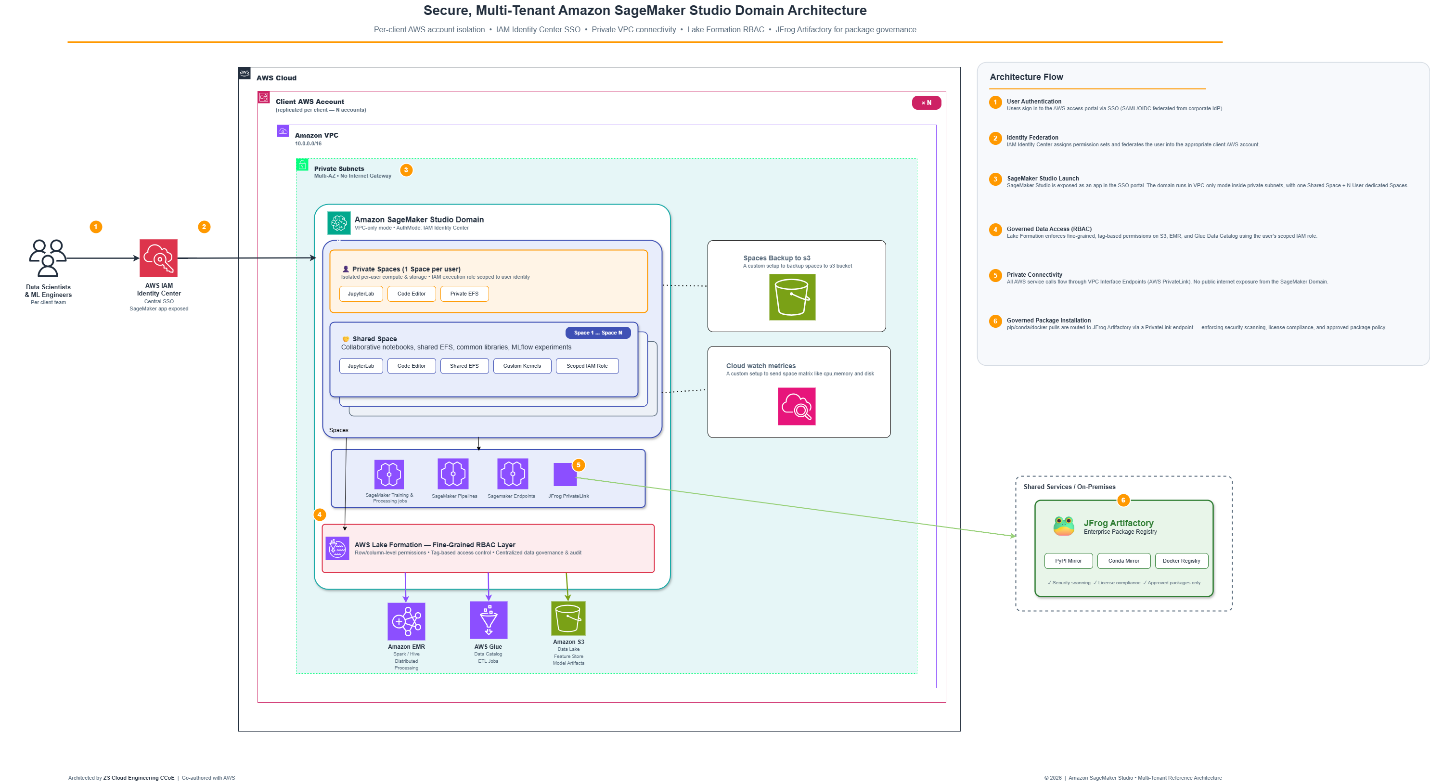
The solution architecture runs in internet-free mode by default, with deployments operating without direct internet access. Amazon Virtual Private Cloud (Amazon VPC) endpoints provide controlled communication with required AWS services. For package management, ZS integrated JFrog Artifactory with upward repository linking and real-time package scanning to prevent unauthorized or tampered code from entering the environment.
Technical architecture
The platform uses a multi-tenant architecture with separate Amazon SageMaker domains per tenant. Each domain maintains isolated Amazon Elastic File System (Amazon EFS) volumes, distinct AWS Identity and Access Management (IAM) roles, and controllable network settings. This design provides strong isolation that supports granular cost tracking and access control.
Figure 1: Secure multi-tenant SageMaker Studio domain architecture
ZS implemented a three-tier IAM role structure: Domain Execution Roles serve as defaults for users, Studio User Roles override domain defaults for fine-grained control, and Space Execution Roles govern shared workspaces. This hierarchy applies the principle of least privilege throughout the platform and maintains operational flexibility.
Details
For data protection, the team enabled AWS Key Management Service (AWS KMS) encryption by default across resources. Amazon EFS volumes, Amazon Simple Storage Service (Amazon S3) buckets, Amazon Elastic Container Registry (Amazon ECR), and AWS CodeCommit repositories inherit encryption automatically (ZS’s CodeCommit deployment predates the service’s closure to new customers in July 2024.). The platform integrates CrowdStrike for OS-level threat detection and Splunk for log aggregation, with AWS CloudTrail logging all API calls to support audit trails.
Driving measurable business impact
ZS successfully rolled out the platform to most application team members, establishing Amazon SageMaker as their primary ad-hoc analytics tool. The solution delivers several quantifiable benefits:
- Operational efficiency: Automated lifecycle configurations enforce compliance and cost controls without manual intervention. Because SageMaker does not include a native backup capability, ZS built a custom lifecycle configuration that automatically syncs user data and scripts to Amazon S3 at regular intervals, giving every user a resilient environment without having to manage backups themselves. For cost control, IAM policies restrict users to a set of smaller, pre-approved instance types. Provisioning a higher-end instance requires a separate allowlisting request to the analytics team. Together with auto-shutdown configurations that release idle resources, these controls prevent over-provisioning and eliminate idle resource costs.
- Security compliance: The platform meets healthcare sector security requirements through comprehensive controls including network isolation, encryption at rest and in transit, real-time threat detection, and complete audit logging.
- Cost optimization: Tag-based cost allocation supports accurate chargeback models. Every domain and resource is tagged by team and project, and AWS Cost Explorer uses these tags to provide spending visibility across domains, users, and projects. This lets ZS attribute costs accurately and bill each team for its actual usage. Across 200+ SageMaker domains and 500+ daily active users, monthly SageMaker spend exceeds $50K, according to ZS internal cost tracking. ZS applies SageMaker Savings Plans to that spend, saving approximately $10K per month, and lifecycle policies automatically shut down inactive resources to minimize idle costs.
- Governance at scale: ZS implemented fine-grained access controls across Amazon SageMaker features. IAM policies restrict access to Amazon SageMaker Data Wrangler, Amazon SageMaker Autopilot, and Amazon SageMaker JumpStart based on user roles. Notebook Jobs require explicit IAM Role ARNs for execution, ensuring accountability for each compute operation.
- Production scale and validation: ZS runs the platform in production at significant scale: 200+ SageMaker domains deployed across multiple AWS accounts, with 500+ users on the platform daily. Custom implementations including Streamlit-based self-service tooling, automated lifecycle configurations, and tag-based chargeback have reduced manual compliance overhead and cut down on AWS Management Console dependency. SageMaker has become the primary ad-hoc analytics tool for the majority of ZS application teams, which is the clearest signal that the platform meets their day-to-day needs in a regulated environment.
- Data durability: The backup strategy uses AWS Backup with tag-based automation. Amazon EFS volumes tagged with “ZS_Backup” receive automatic protection with retention policies stored in dedicated backup vaults. This approach allows rapid recovery for domain migration scenarios and maintains data durability.
SageMaker domain custom implementations
Standard SageMaker gave ZS a strong foundation, but running it as the primary ad-hoc analytics platform for a regulated, multi-team organization surfaced gaps that out-of-the-box features didn’t address: resilient backups for user work, tight cost guardrails on interactive sessions, safe package installation without internet access, and self-service access to data and infrastructure without opening the console. Rather than compromise on security or push that burden onto users, ZS built a set of targeted customizations on top of SageMaker to close each gap. The following sections walk through these implementations and the specific problem each one solved. Together, they turned SageMaker into a self-service analytics platform that hundreds of users rely on daily while ZS retains centralized governance.
- SageMaker Spaces backup: SageMaker Spaces can be deleted or archived as part of normal workflows. To make sure users’ work is preserved across Space lifecycle changes, ZS built an automated backup solution that provisions a dedicated Amazon S3 bucket per domain at creation time and syncs each Space’s data to that bucket every 30 minutes. This gives users resilient, hands-off protection of their work, and the tag-based design also makes domain migration straightforward.
The following figure shows backup files stored in the Amazon S3 bucket, organized by Space name and timestamp.
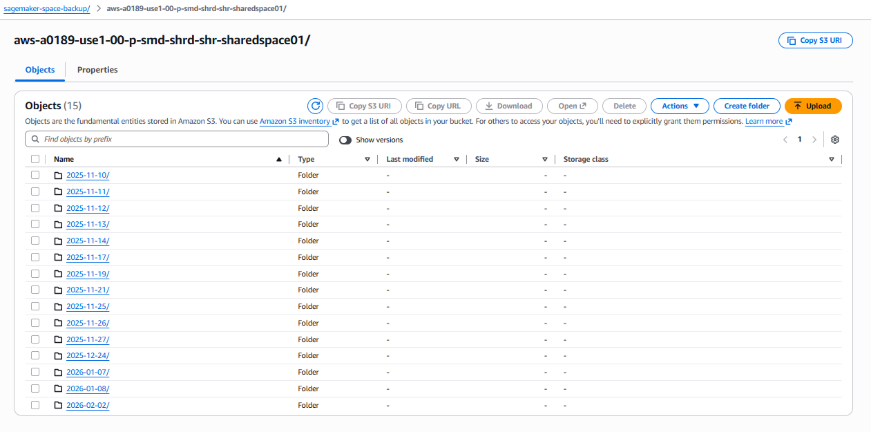
Figure 2: Space backup files in Amazon S3, organized by Space and timestamp
- AWS Glue interactive sessions: When data engineers use the AWS Glue PySpark or Spark kernels in SageMaker, AWS Glue spins up interactive sessions in the background that can quietly over-provision if left unmanaged. ZS built a configuration management solution that enforces default settings for idle timeout, connections, worker count, and worker type across every session. This keeps resource allocation consistent and gives ZS centralized cost control over AWS Glue workloads without data engineers having to think about it.
The following figure shows the available Glue kernels in the SageMaker JupyterLab launcher, so data engineers can select PySpark or Spark environments directly. After a kernel is selected, the Glue interactive session launches with the pre-configured default settings, which keeps resource allocation consistent across all users.
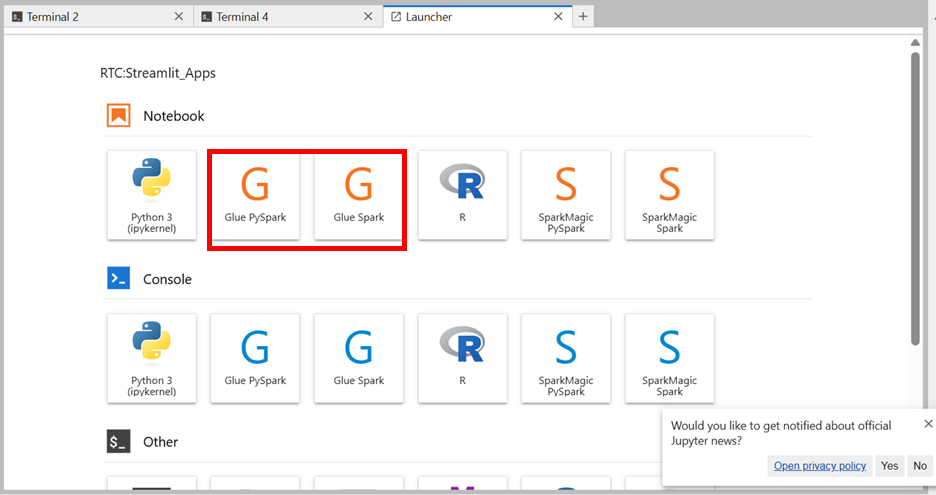
Figure 3: Glue PySpark and Spark kernels in the SageMaker JupyterLab launcher
- Secure package management using JFrog: In an internet-free environment, ZS still needed data science teams to install packages, but without exposing the platform to unauthorized or tampered code. The team routed all installations exclusively through JFrog Artifactory, which scans packages before they enter the environment and covers pip, Debian (apt), and Maven package managers. This gives teams the libraries they need while keeping package sourcing controlled and auditable.
The following figure shows a successful pip installation routed through JFrog, confirming that packages come from the approved repository rather than the public internet.
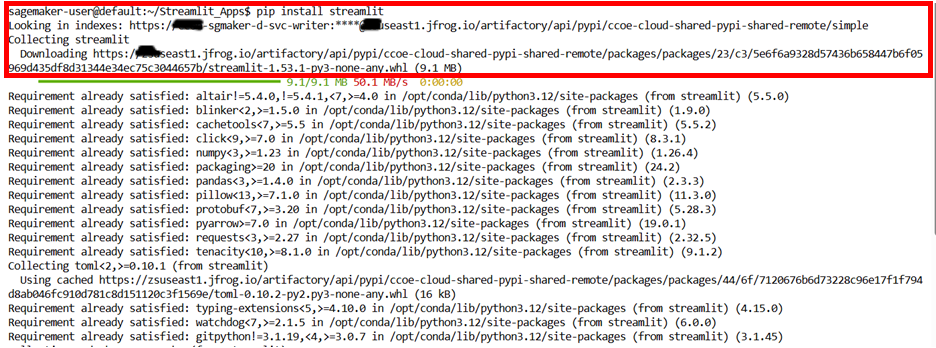
Figure 4: A pip installation routed through JFrog Artifactory
- R kernel setup on SageMaker: Several ZS teams needed R for statistical analysis, but SageMaker does not offer an R kernel by default. Using a lifecycle configuration, ZS provisioned an R kernel and made it a standard option in the JupyterLab launcher alongside Python and AWS Glue. Statistical teams now work in their language of choice inside the same governed environment as everyone else.
- S3 browser integration: Routine data browsing previously meant leaving SageMaker for the console, adding friction and extra access requests. ZS installed a SageMaker S3 browser extension that provides a file-explorer view of Amazon S3 buckets directly inside JupyterLab. Users can browse and manage their data without ever leaving the notebook environment, which cut down on console access requests.
- Streamlit applications: To further reduce dependency on the console, ZS built a suite of self-service Streamlit applications that run inside SageMaker Spaces, with SageMaker execution roles enforcing access controls behind the scenes. These include an Amazon Redshift start/stop tool scoped to specific clusters, a DuckDB-powered tool for querying Amazon S3 data directly, and an Amazon EMR provisioning app for creating transient clusters from pre-approved configurations. Users perform common infrastructure operations through simple web interfaces while ZS keeps governance centralized.
The following figures show the Streamlit application home page and the Amazon EMR cluster provisioning interface, which guides users through configuration options including software release version, node type, and worker count. Additional interfaces include the Amazon Redshift cluster start/stop tool and the DuckDB Amazon S3 query application, which displays query results in a table directly within the SageMaker environment.
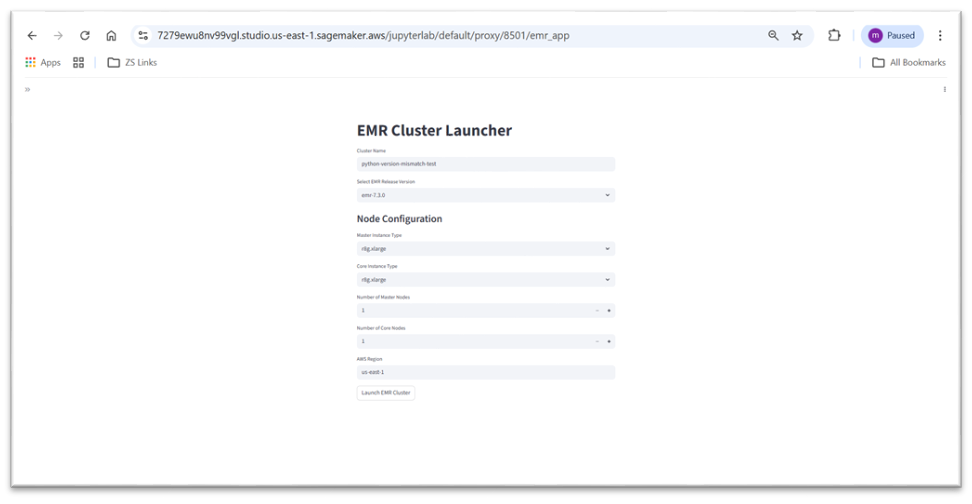
Figure 5: Streamlit application for Amazon EMR cluster provisioning
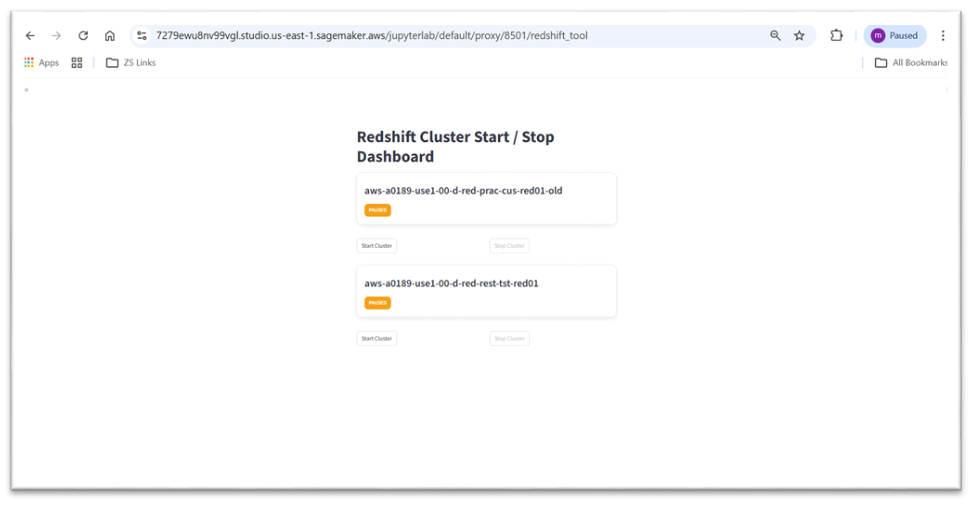
Figure 6: Streamlit Amazon Redshift cluster start/stop dashboard
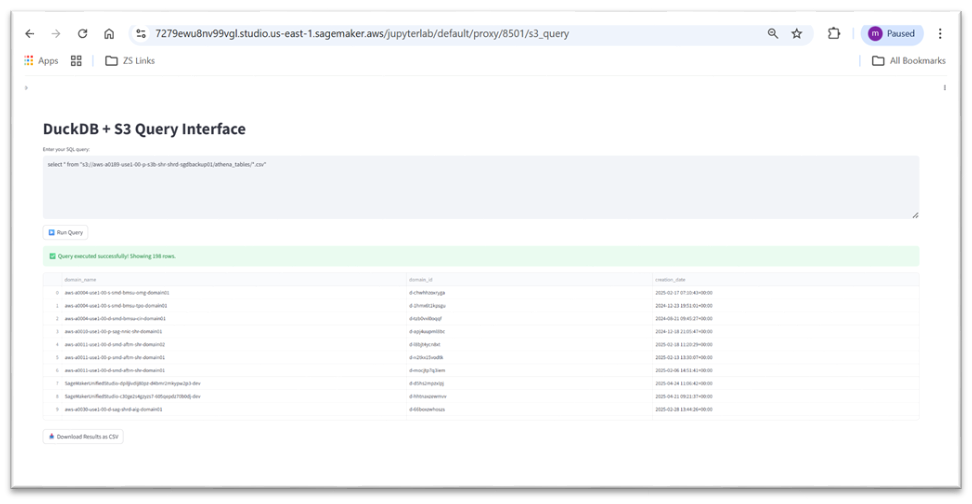
Figure 7: DuckDB application querying Amazon S3 data in SageMaker
- SageMaker Space monitoring: Running SageMaker at scale, ZS needed per-Space visibility into CPU, memory, and disk utilization to plan capacity and manage cost effectively. The team built custom Amazon CloudWatch metrics that publish Space-level utilization data every minute. Administrators can now spot resource-constrained Spaces, right-size allocations, and stay ahead of cost and capacity issues.
The following figure shows the custom CloudWatch dashboard displaying Space-level metrics across the SageMaker environment.
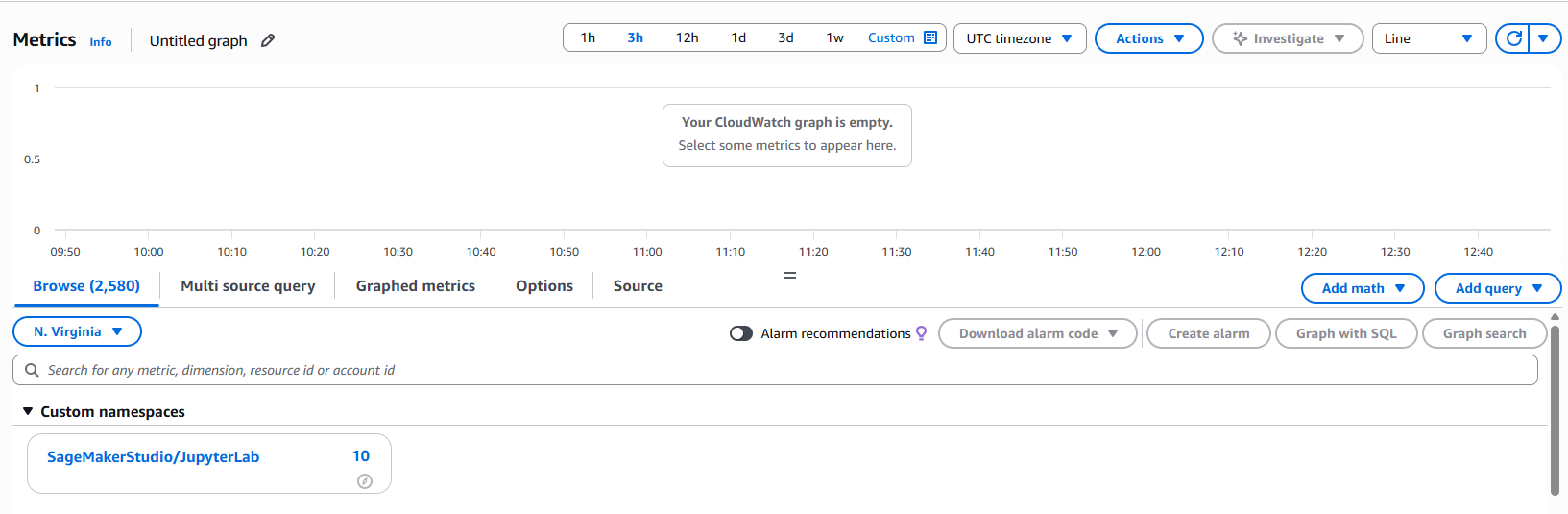
Figure 8: Custom SageMakerStudio/JupyterLab namespace in the CloudWatch metrics console
Detailed CPU, memory, and disk utilization metrics are visualized per Space, so administrators can identify resource-constrained environments and optimize allocation.
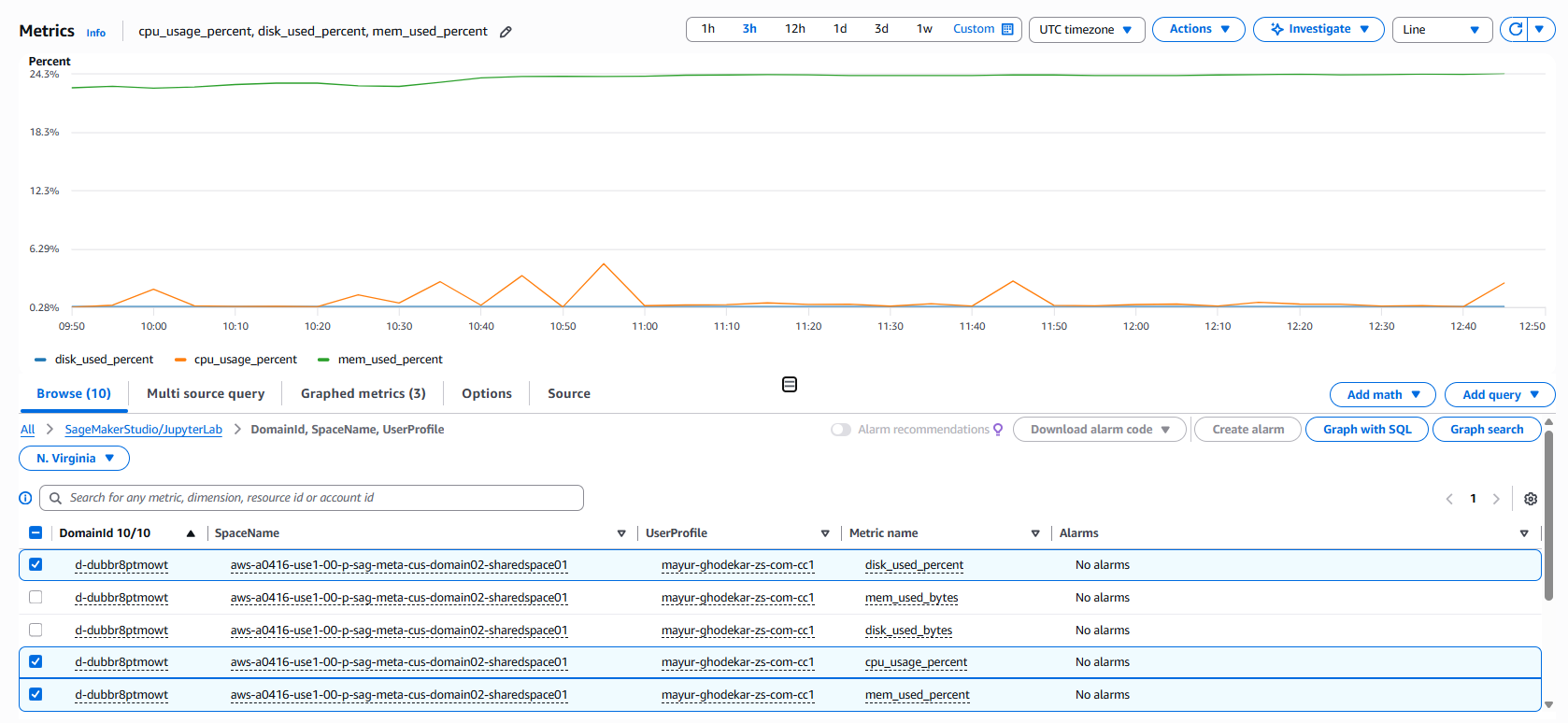
Figure 9: Per-Space CPU, memory, and disk utilization in the CloudWatch dashboard
- Custom Python versions per Space: Some teams required specific Python versions for library compatibility. ZS enabled per-Space Python version selection through lifecycle configurations, so teams can pin their environment without affecting other tenants. This maintains isolation while supporting diverse dependency requirements.
Future innovation
Building on this production foundation, ZS continues enhancing the platform with additional capabilities. The team is exploring Amazon SageMaker Feature Store for centralized feature management and Amazon SageMaker Model Registry for ML lifecycle governance. These additions will further streamline ML operations and maintain the security posture that enabled initial adoption.
The firm is also evaluating Amazon SageMaker Pipelines for workflow orchestration and Amazon SageMaker Model Monitor for production model oversight. These services will extend governance controls into production ML workloads, completing the end-to-end ML platform vision.
Conclusion
ZS’s journey demonstrates that democratizing access to advanced analytics and maintaining rigorous security controls are achievable together. With 200+ SageMaker domains deployed across AWS accounts and 1,000+ daily active users, the platform has become the primary ad-hoc analytics tool for the majority of ZS application teams. Monthly SageMaker spend exceeds $50K, and ZS offsets roughly $10K of that spend with Savings Plan discounts, reflecting both the scale of adoption and the cost discipline built into the architecture. The result is a production platform that proves developer agility and strict governance can coexist, and it serves as a replicable model for healthcare and life sciences organizations facing similar challenges.
To learn more about implementing secure ML platforms, visit the Amazon SageMaker documentation or contact your AWS account team to discuss your requirements.
About the authors
Source
Originally published at aws.amazon.com.