Automating Amazon Textract adapter lifecycle management across accounts
Learn how to operationalize Amazon Textract Custom Queries adapters for production: infrastructure as code with AWS CloudFormation and Terraform, a cross-account adapter promotion process, a pre-classification routing pattern for multiple form versions, and production security controls such as VPC endpoints, encryption, and least-privilege IAM.
Overview
Amazon Textract is a fully managed machine learning (ML) service that automatically extracts text, handwriting, layout elements, and structured data from scanned documents. Organizations use Amazon Textract to automate document processing workflows such as invoice processing, mortgage application intake, insurance claim handling, and identity verification, eliminating manual data entry and accelerating downstream decision-making. Amazon Textract Custom Queries adapters extend this capability so you can fine-tune extraction for your specific document types, improving accuracy on forms with unique layouts or domain-specific terminology. For more information, see the Amazon Textract Custom Queries documentation.
While this post uses Custom Queries adapters for its examples and API calls, the lifecycle management patterns such as solution architecture, promotion strategies, and security configurations are adapter-type agnostic and apply equally to Forms and Tables adapters. In this post, you will find infrastructure templates (AWS CloudFormation and Terraform), a documented process for promoting adapters across accounts, production security configurations, and a pre-classification pattern for document routing. By externalizing adapter IDs into AWS Systems Manager Parameter Store, you can update production adapter references with zero downtime and no application redeployment, so a change that once took hours or days of coordination takes seconds.
Moving document extraction workloads from proof of concept to production requires a structured approach to adapter lifecycle management. Amazon Textract adapters extend the pre-trained Amazon Textract deep learning model as modular components, customizing its output for your specific document types. To create an adapter, you upload sample documents, annotate them with queries and expected responses, and train the adapter to recognize your document’s unique layout patterns. This improves extraction accuracy for your specific forms. You do not need to build custom ML models.
However, once you move past proof of concept, three core challenges emerge:
Adapter promotion: How do you move trained adapters from training to production across AWS accounts? The process currently requires AWS Support tickets, and only trained model weights transfer. Query definitions and training data do not transfer. Without automation, this becomes a manual bottleneck that slows your release cadence.
Document routing: Amazon Textract supports one adapter per AnalyzeDocument API call per page per feature type. If you process multiple form versions (and most enterprises do), you need a routing mechanism upstream of your Amazon Textract calls to select the correct adapter for each document.
Production security: Regulated industries require encryption at rest and in transit, network isolation, least-privilege AWS Identity and Access Management (IAM), comprehensive audit logging, and compliance certifications. The following security controls further harden your Amazon Textract deployment and confirm it is production-ready for regulated workloads.
Note: Supported formats and API constraints
Amazon Textract supports JPEG, PNG, PDF, and TIFF file formats. The synchronous AnalyzeDocument API processes single-page documents (or the first page of multi-page files), while the asynchronous StartDocumentAnalysis API handles multi-page PDFs and TIFFs up to 3,000 pages. XFA-based PDFs are not supported. For the full list of quotas, see Set Quotas in Amazon Textract.
Solution overview
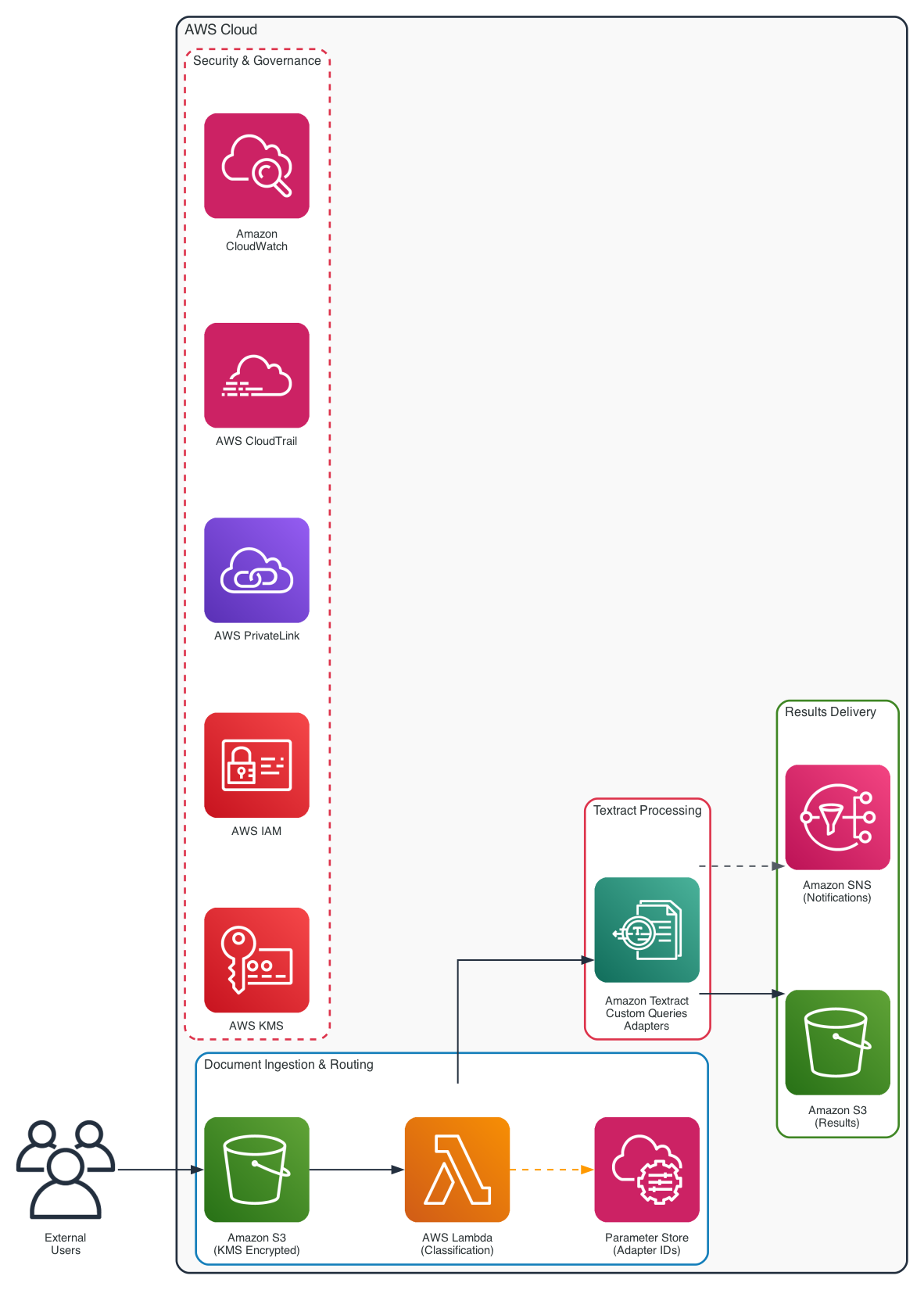
You implement a multi-stage processing pipeline that separates concerns between document classification, adapter selection, and extraction:
Figure 1: Amazon Textract adapter lifecycle architecture showing the document processing pipeline
- Document ingestion. Documents arrive in an Amazon Simple Storage Service (Amazon S3) bucket encrypted with server-side encryption. The sample code in this post uses S3-managed encryption (AES256) for simplicity. For production workloads, use AWS Key Management Service (AWS KMS) customer managed keys to gain full control over key rotation and access policies.
- Pre-classification. For each incoming document (in any supported format), a lightweight routing step extracts raw text using DetectDocumentText, then identifies the document version by scanning for text markers (form titles, version identifiers, field labels).
- Adapter selection. Based on the classification result, the correct adapter ID is retrieved from AWS Systems Manager Parameter Store (Parameter Store).
- Amazon Textract processing. The AnalyzeDocument or StartDocumentAnalysis API is called with the selected Custom Queries adapter.
- Results delivery. Extracted key-value pairs flow to downstream processing systems (databases, workflow engines, or human review queues).
For production deployments, route API calls through AWS PrivateLink for network isolation. IAM enforces least-privilege access. AWS CloudTrail provides API audit logging and Amazon CloudWatch handles operational monitoring and alerting.
This architecture decouples adapter management from application logic. When you train a new adapter version or promote an adapter to a new environment, you update only the SSM parameter. No application code changes or redeployments are required.
Multi-environment topology
The adapter lifecycle described here spans four environments as a recommended best practice for production workloads. However, a multi-environment setup is not mandatory. You can adapt this model to match your organization’s existing account structure and operational maturity.
For smaller teams or early-stage implementations, you can start with as few as two environments (training and production) in a single AWS account, using naming conventions, tags, and separate S3 buckets to isolate workloads. As your adapter portfolio grows, you can expand to dedicated accounts. The following environments represent logical stages, not a strict requirement for separate AWS accounts. Many organizations map these stages to their existing AWS account strategy (for example, an AWS Organizations structure with workload OUs), while others run multiple stages within a single account using resource-level isolation:
- Training: Adapter creation, training, and annotation.
- Validation: Testing against diverse test document sets. Regression testing.
- Pre-production: Integration testing with downstream systems. Performance benchmarking.
- Production: Live document processing with full security controls.
Promotion strategies
Two architectural approaches exist for moving adapters between environments:
Approach 1: Cross-Account Copy (Standard). You train the adapter in your training account (the account where adapters are created and trained), then copy it to each downstream account through an AWS Support ticket. Each environment maintains its own adapter ID. This approach is more straightforward for organizations with a small number of adapters (fewer than 10) and infrequent updates.
Approach 2: Centralized Hub Account. You train all adapters in a single dedicated hub account. Environments (training, validation, pre-production, production) invoke Amazon Textract in the hub account through cross-account IAM roles. This eliminates repeated support tickets and adapter copying entirely. This approach reduces operational overhead for organizations managing many adapters with frequent updates, though it introduces cross-account networking complexity.
Details
You can choose either approach based on your requirements. The right selection depends on your organization’s adapter count, update frequency, and networking constraints.
Technical implementation
This section walks through the infrastructure setup, environment promotion process, and API call patterns needed to operationalize your adapter pipeline.
Prerequisites
To follow along with this post, you need the following:
- An AWS account.
- IAM permissions to create and manage Amazon Textract adapters, Amazon S3 buckets, AWS KMS keys, and AWS Systems Manager Parameter Store (Parameter Store) parameters.
The following IAM policy provides the minimum permissions needed to create and manage adapters, process documents, and read and write the associated S3 and Parameter Store resources:
If you use AWS KMS encryption on your S3 buckets, add kms:Decrypt for the source bucket key and kms:GenerateDataKey for the output bucket key.
- AWS CLI v2 installed and configured.
- Sample documents (minimum 5 training and 5 test documents) for adapter training.
- For multi-account promotion: access to both source and destination AWS accounts in the same Region.
- (Optional) AWS CloudFormation or Terraform (version 1.4 or later, required for the terraform_data resource) for infrastructure as code deployment.
Infrastructure as code
Amazon Textract is a fully managed service with no servers to provision or clusters to configure. You can create and manage adapters through the AWS Management Console, the AWS CLI, or the AWS SDKs. This post focuses on CLI and infrastructure-as-code approaches to enable repeatable, automated deployments. Supporting infrastructure (IAM roles, S3 buckets, KMS keys, SSM parameters, CloudWatch alarms) is managed through CloudFormation or Terraform. Create adapters using the AWS CLI. You can wrap the CLI call in a CloudFormation custom resource backed by AWS Lambda, or run it as a step in your continuous integration and continuous delivery (CI/CD) pipeline.
Supporting infrastructure (AWS CloudFormation)
This CloudFormation template provisions the core supporting infrastructure for an Amazon Textract adapter workload
Adapter creation with the AWS CLI
Since adapters cannot be created via CloudFormation natively, use the AWS CLI. This can be wrapped in a CloudFormation Custom Resource backed by Lambda, or executed as a step in your CI/CD pipeline:
See create-adapter.sh for the full implementation and to explore further CLI command reference.
Alternative: Terraform with terraform_data
For organizations using Terraform, use terraform_data (introduced in Terraform 1.4 as the successor to the deprecated null_resource) with local-exec provisioners. Per AWS Prescriptive Guidance, consider this a temporary solution and regularly check if native Terraform provider support has been added for Amazon Textract adapter resources.
A Terraform equivalent for the supporting infrastructure is available under Terraform module. Alternatively, you create adapters with the AWS CLI as shown earlier.
Environment promotion with CI/CD
Adapter promotion between AWS accounts follows a three-step process based on the official AWS documentation for copying adapters. Understanding this process is critical because it differs significantly from how you promote other AWS resources.
An adapter learns the structure and field layout of a document type. It does not learn the content of any individual document. Once trained on a representative sample in development, the same adapter accurately extracts data from any new document of that type in production.
For example, you train an adapter on 10 sample ABC forms so it learns the layout and fields. In production, that same adapter processes 18,000 different ABC forms of that type.
Step 1: Prepare
- Gather the following information before initiating a copy request:
- Source adapter ID and version number.
- Source AWS account ID and Region.
- Destination AWS account ID (must be in the same Region).
- Adapter name and feature type.
How the copy process works:
- Source and destination accounts must be in the same AWS Region. Submit a separate request for each Region as needed.
- Each adapter version requires its own copy request, giving you control over which versions to promote.
- Only trained model weights are transferred. Maintain query definitions and training data in your own configuration store (such as Parameter Store or a version-controlled file).
- You must maintain your own records of query configurations per adapter externally.
Step 2: Request a copy through AWS Support
Open an AWS Support case requesting an adapter copy. Include all details from Step 1: Region, source AWS account, adapter ID, adapter version, destination AWS account, and adapter ID.
You must have already created an adapter in the destination account using the console or API. You are not required to train an adapter version in the destination. Only the metadata (adapter name and description) must exist. Submit the request through AWS Support and monitor your case for completion notification.
Step 3: Validate in the destination
After the copy completes, run your test document set through the copied adapter to verify extraction accuracy matches your baseline:
Alternative: Centralized hub account
If you manage many adapters with frequent updates, consider a centralized hub account:
- Train all adapters in a single dedicated hub account.
- Environments (training, validation, pre-production, production) invoke Amazon Textract in the hub account through cross-account IAM roles.
- This eliminates the need for repeated support tickets and adapter copying.
This approach trades cross-account networking complexity for operational simplicity in adapter management. It works particularly well when you have a dedicated ML platform team that owns adapter training and quality.
Cross-account IAM role trust policy
In the hub account, create a role that workload accounts can assume to invoke Amazon Textract. The following trust policy allows the specified workload accounts to assume the role. The ExternalId condition prevents confused deputy attacks. In each workload account, the processing Lambda assumes this cross-account role using sts:AssumeRole before calling the Amazon Textract APIs.
Attach a permissions policy to this role scoped to the Amazon Textract actions needed:
As of now, these actions do not support resource-level permissions (see Actions, resources, and condition keys for Amazon Textract ), so Resource must be set to “*“. Consider limiting the policy to only the necessary actions.
Cost implications
With the centralized hub approach, all Amazon Textract API charges accrue to the hub account. Consider the following when evaluating this approach:
- Billing consolidation: All Amazon Textract usage bills to a single account, which simplifies cost tracking but requires internal chargeback mechanisms (such as AWS cost allocation tags) to attribute costs to individual workload teams.
- Pricing model: Amazon Textract charges per page processed, and Custom Queries with adapters are charged at a higher rate than basic text detection. Consolidating volume into one account does not unlock volume discounts, because Amazon Textract uses flat per-page pricing.
- Data transfer: Cross-account S3 access within the same Region incurs no data transfer charges. However, if workload accounts pass documents to the hub account’s S3 bucket, factor in S3 PUT/GET request costs.
- Comparison with cross-account copy: With the copy approach, each account pays for its own Amazon Textract usage independently, which provides natural cost isolation per team but duplicates adapter management effort.
Service quotas consideration: Before adopting this centralized hub approach, evaluate your aggregate transactions per second (TPS) requirements across all workload accounts, centralizing API calls means all environments compete for a single account’s Amazon Textract quotas. Request quota increases proactively through the Service Quotas console and note that the “Maximum number of adapters” and “Maximum AdapterVersions created per month” quotas apply to the hub account collectively (these are adjustable default quotas, so check the current values for your Region in the Service Quotas console). If your combined peak throughput exceeds what a single account can sustain even after increases, consider the distributed (cross-account copy) approach for fault isolation.
Choose centralized hub when you have <10 adapter types, predictable throughput, and a platform team. Choose distributed (copy) when you have high-burst workloads, strict fault isolation requirements, or >10 adapter types across teams.
Pre-classification and API call patterns
This section explains how to route each document to the correct adapter and how to call Amazon Textract for synchronous and asynchronous processing.
Document routing
Amazon Textract applies one adapter per page per feature type, and a page can have only one adapter applied to it. Because the synchronous AnalyzeDocument API processes a single page, it uses at most one adapter per call. There are two ways to handle multiple form versions. To route many separate documents of differing form versions, use the following pre-classification pattern to select one adapter per document. This works with both the synchronous and asynchronous APIs. To apply different adapters within a single multipage document, use the asynchronous StartDocumentAnalysis API and scope each adapter with the Pages parameter in AdaptersConfig.
Text-based classification
One approach to address the single-adapter constraint is a lightweight text-based classification step that scans document content for version-specific markers (form titles, version identifiers, revision dates, or distinctive field labels) and routes to the appropriate adapter. The routing logic matches document text against configurable form markers and retrieves the corresponding adapter ID from Parameter Store. See this sample for the complete implementation.
Other approaches include using Amazon Comprehend for document classification, maintaining a lookup table based on document metadata, or using the document’s S3 key prefix as a routing signal. The right choice depends on your document diversity and classification accuracy requirements.
After the routing logic selects the correct adapter ID, invoke Amazon Textract using either the synchronous or asynchronous pattern depending on your document size.
Calling Amazon Textract with an adapter
Choose the synchronous or asynchronous API based on your document size and page count.
Synchronous
For single-page documents (up to 10 MB), use the synchronous AnalyzeDocument API:
Asynchronous
For multi-page documents, or files that exceed the 10 MB synchronous limit, use the asynchronous StartDocumentAnalysis API.
This follows the same adapter and query configuration but adds an OutputConfig for S3 result storage and optionally a NotificationChannel for completion alerts through Amazon Simple Notification Service (Amazon SNS). See async_analyze.py for the complete implementation.
Adapter versioning practices
Understanding when to create a new adapter versus a new version of an existing adapter is critical for maintaining a clean, manageable adapter inventory. With Amazon Textract, you can maintain multiple versions of an adapter simultaneously for use in your development pipelines, so you can roll back and run parallel tests.
When to create a new adapter
- Processing a different document type or form family (for example, switching from insurance claims to loan applications)
- Using a different feature type (Queries, Forms, or Tables)
- Starting a new use case entirely.
- Running A/B testing scenarios between fundamentally different approaches.
When to create a new version of an existing adapter
- Adding, removing, or rephrasing queries for the same document type.
- Expanding training data with additional sample documents.
- Fixing annotation errors discovered during production monitoring.
- Improving edge case handling for specific document variations.
Recommended versioning practices
- Training minimum. 5+ training documents and 5+ test documents per adapter.
- Maximum capacity. Up to 2,500 training pages and 1,000 test pages.
- Sample diversity. Verify documents represent all aspects of your use case.
- Auto-update. Consider disabling in production until regression testing exists.
- Active versions. Maintain multiple versions (production + rollback + pre-production).
- Query documentation. Document queries externally. Amazon Textract does not store query text as discrete retrievable artifacts.
Important: When you copy an adapter between accounts, only the trained model weights transfer. Query definitions and training data do not transfer. Maintain a separate configuration store (such as Parameter Store or a version-controlled config file) that maps each adapter to its complete query set.
Security best practices
Production document processing workloads often handle sensitive data including personally identifiable information (PII), financial records, and protected health information (PHI). Amazon Textract supports multiple layers of security controls that you should implement as defense-in-depth for these workloads. The following subsections detail the key security domains to address.
Network isolation with VPC endpoints
Deploy an interface virtual private cloud (VPC) endpoint (AWS PrivateLink) for Amazon Textract so that API traffic never traverses the public internet. With a VPC endpoint, instances in your VPC communicate with the Amazon Textract API through private IP addresses on the Amazon network. This eliminates the need for an internet gateway, NAT device, or VPN connection. Configure the VPC endpoint policy to restrict which IAM principals can invoke Amazon Textract actions through the endpoint and apply security groups to the endpoint network interfaces to control inbound traffic at the network level. For implementation details, see Amazon Textract and interface VPC endpoints.
Encryption at rest and in transit
All communication with Amazon Textract uses TLS 1.2+ encryption in transit. For encryption at rest, configure your S3 input and output buckets with server-side encryption using customer managed AWS KMS keys (SSE-KMS). This gives you full control over key rotation, access policies, and audit trails. When using the asynchronous API with OutputConfig, the results written to your S3 bucket inherit the bucket’s default encryption settings. Make sure the IAM role used by Amazon Textract has kms:Decrypt permissions on the input bucket’s KMS key and kms:Encrypt permissions on the output bucket’s KMS key. For more information, see Encryption in Amazon Textract.
IAM least-privilege access
Apply least-privilege IAM policies that scope permissions to the minimum required actions and resources. For document processing, restrict to specific actions (textract:AnalyzeDocument, textract:StartDocumentAnalysis, textract:GetDocumentAnalysis) and specific S3 bucket ARNs rather than using wildcard resources. Use the aws:CalledViaFirst condition key in your S3 bucket policies to restrict object access to requests that originate from Amazon Textract, providing defense-in-depth against direct bucket access. For cross-account adapter scenarios, use explicit resource-based policies and external IDs to prevent confused deputy attacks. See Amazon Textract Identity-Based Policy Examples for sample policies.
Logging, monitoring, and alerting
Enable AWS CloudTrail logging for all Amazon Textract API calls to maintain an audit trail of who accessed which documents and when. Configure Amazon CloudWatch metrics and alarms to monitor API throttling (ThrottledCount), error rates, and latency. For production workloads, set up CloudWatch Logs to capture detailed processing results and create alarms for anomalous patterns such as sudden spikes in failed extraction requests, which could indicate misconfigured adapters or unauthorized access attempts. Consider aggregating logs to a centralized security account using AWS Organizations for cross-account visibility.
Data privacy and ML opt-out
By default, AWS may use content processed by Amazon Textract to improve and develop the service. For sensitive document workloads (PII, PHI, financial data), opt out of this usage by attaching an AI services opt-out policy at the organization, organizational unit (OU), or account level through AWS Organizations. When you opt out, AWS does not store or use your content for service improvement while the service continues to function identically for your workloads. Additionally, documents processed synchronously do not persist after the API response is returned. For asynchronous processing, results are stored in your specified S3 bucket under your encryption controls. See AI services opt-out policies for setup instructions.
Compliance certifications
Amazon Textract is eligible for use in workloads subject to HIPAA, PCI DSS, FedRAMP High, SOC 1/2/3, ISO 27001/27017/27018, and HITRUST CSF compliance frameworks. Verify current certification status on the AWS services in scope page and confirm your implementation follows the shared responsibility model, where AWS secures the underlying infrastructure and you secure your configuration, access controls, and data handling practices.
Clean up
To avoid incurring ongoing charges, delete the following resources if you created them while following this post:
- Delete the Amazon Textract adapter:
- Delete the SSM parameters:
- Delete the CloudFormation stack (this removes the IAM role, S3 buckets, and all associated resources):
If you deployed using Terraform, run terraform destroy from the terraform/ directory.
Conclusion
In this post, we showed how to operationalize Amazon Textract Custom Queries adapters for production workloads by addressing three key challenges that every enterprise faces when moving beyond proof of concept.
Supporting infrastructure and adapter configuration. Use CloudFormation or Terraform to provision IAM roles, S3 buckets, and KMS keys, and CLI commands or terraform_data to create adapters. Parameter Store decouples adapter IDs from application code, so you can update references with zero downtime.
Multi-environment promotion. If you manage many adapters, a centralized hub account eliminates cross-account copying entirely by having environments invoke adapters from a single account, an alternative to the cross-account copy process.
Production security hardening. For regulated industries, consider implementing VPC PrivateLink for network isolation, customer managed AWS KMS encryption with OutputConfig for data-at-rest control, least-privilege IAM policies, and CloudTrail for comprehensive audit logging to support your Amazon Textract workloads.
Key takeaways
- Amazon Textract adapters require a routing mechanism because only one adapter can be applied per page per API call.
- Adapter copies between accounts transfer only trained model weights. Maintain query configurations separately.
- Always specify OutputConfig with async APIs to control where results are stored.
- Parameter Store decouples adapter IDs from application code, so you can update adapter versions with zero downtime.
- For production workloads, consider adding AWS KMS encryption, VPC endpoints for network isolation, and CloudTrail for audit logging.
- Use aws:CalledViaFirst condition keys on S3 bucket policies for defense-in-depth.
- Opt out of ML training through an AWS Organizations policy for sensitive document workloads.
About the authors
Source
Originally published at aws.amazon.com.