Agent Skills for Automated Reasoning policies in Amazon Bedrock
Learn how to run the full Amazon Bedrock Automated Reasoning policy lifecycle from your coding agent. A suite of open source Agent Skills builds, reviews, tests, debugs, deploys, and validates a custom policy end to end, turning a specialized console task into a repeatable engineering workflow.
Overview
Teams that adopt Amazon Bedrock Automated Reasoning checks often want to run the policy lifecycle in code. Running it in code keeps the work repeatable, reviewable, and driven by the coding agent they already use. Authoring a good Automated Reasoning policy has a learning curve, and the lifecycle has constraints that can trip you up. You write rules in a subset of SMT-LIB (a standard input format for automated theorem provers) and tune variable descriptions until the service translates real user language correctly. You also move a policy through a build, test, and refine loop with its own APIs and constraints.
Automated Reasoning checks are worth that effort because they validate outputs against formal logic rather than sampling them statistically. That approach gives you mathematical certainty that AI responses comply with your rules. In Build reliable AI systems with Automated Reasoning on Amazon Bedrock, we walked through this loop in the Amazon Bedrock console. The console is the right place to start and to collaborate with subject matter experts.
In this post, you learn how to use a suite of Agent Skills to build, test, deploy, and validate an Amazon Bedrock Automated Reasoning policy end to end from a coding agent. You also see what running the suite against Amazon Bedrock revealed about how the service behaves.
What are Agent Skills?
Agent Skills are a lightweight, open format from Anthropic. A skill extends a coding agent with specialized knowledge and workflows. It’s a structured context package that teaches the agent how to use a specific service or domain correctly. The agent no longer relies on general training data that may be incomplete or out of date. Each skill carries validated patterns, the common mistakes to avoid, and step-by-step workflows. With that guidance, the agent produces the right calls for the task instead of a plausible guess. Because the format is open, a skill installs into any agent that supports it, including Kiro, Claude Code, Cursor, and Codex. It then activates automatically when you ask the agent about the task it covers.
Why an agent fits the Automated Reasoning lifecycle
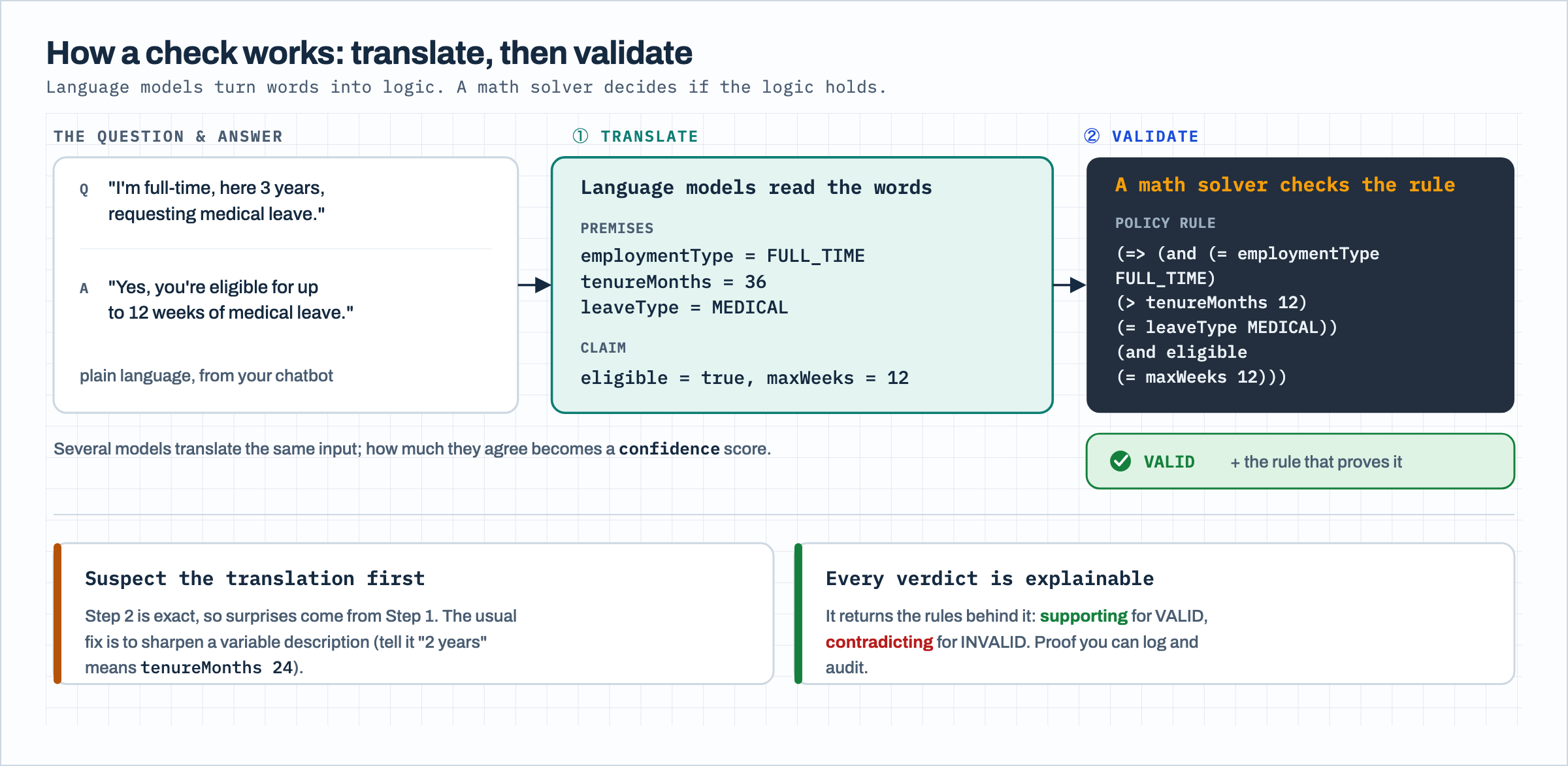
An Automated Reasoning check runs in two steps, and understanding the split is the key to working with it. First, a set of foundation models (FMs) translates the question and answer into formal logic, mapping the natural language to the variables in your policy. Then an SMT solver (Satisfiability Modulo Theories, an automated reasoning engine that checks logical formulas against constraints) validates that logic against your rules and returns a verdict. The validation step is mathematically sound: If the translation is faithful, the verdict is correct. That soundness is also what makes the result explainable. Every verdict comes back with the specific rules that support or contradict it.
Figure 1: How an Automated Reasoning check works
The work sits in the lifecycle around that check. You extract rules from a source document, review what the service produced, write tests that reflect how your users actually ask questions, diagnose the failures, and deploy a versioned policy behind a guardrail. Each step has a specific API shape, and a few have constraints that can trip you up. This is repetitive, detail-heavy work with clear rules and clear failure modes, which is the kind of work a coding agent handles well when you give it the right instructions.
Six skills across the policy lifecycle
The suite is a set of six Agent Skills, one for each stage of the lifecycle. Each skill is a short instruction file that teaches the agent the judgment for its stage, backed by small runnable scripts that call the Amazon Bedrock Automated Reasoning APIs. The skills share one reference document that describes the API surface, the finding types, and the rule syntax, so guidance stays consistent across the suite.
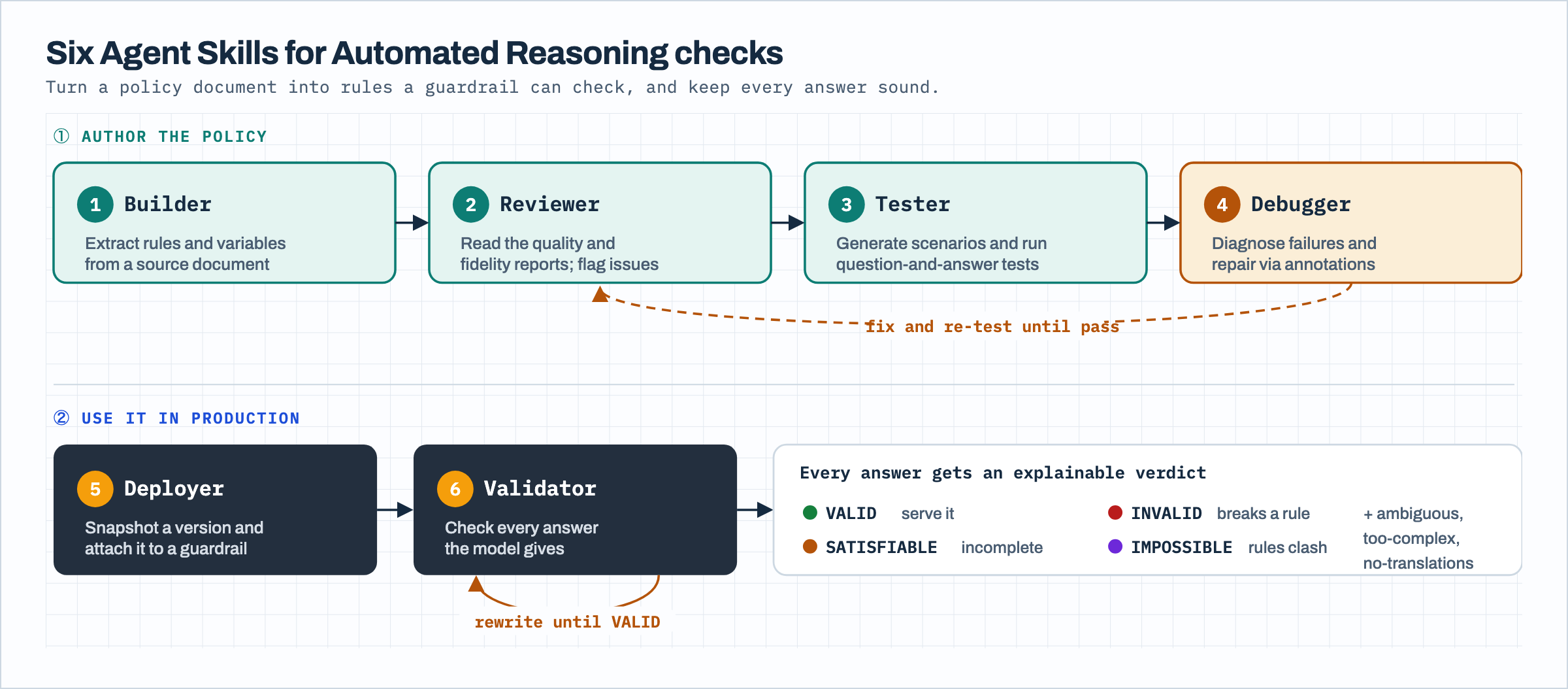
Figure 2: The six skills across the policy lifecycle
At authoring time, the builder skill creates a policy from a source document and extracts its rules and variables. The reviewer skill reads the quality and fidelity reports the build produces and flags issues such as conflicting rules, unused variables, and bare assertions. The tester skill generates scenarios and runs question-and-answer tests that check whether the policy translates and validates real inputs the way you expect. The debugger skill diagnoses failures and repairs the policy, working from the principle that a wrong verdict almost always comes from a translation problem rather than the rules.
At runtime, the deployer skill snapshots a numbered policy version and attaches it to a guardrail. The validator skill checks answers with the ApplyGuardrail API. It can also run a rewrite loop that feeds a failing answer’s contradicting rules back to the model until the answer is sound.
How the skills are structured
Each skill follows the standard Agent Skills layout. A SKILL.md file holds the core instructions for that stage, including when the skill applies and the judgment calls specific to it. A references/ folder holds deeper material, such as the finding types and the rule syntax, that the agent loads only when it needs the detail. A scripts/ folder holds the runnable Python that calls the Amazon Bedrock Automated Reasoning APIs. The scripts are standalone and take a --help flag and a --dry-run flag. You can read what an operation does and inspect the exact request before it reaches Amazon Bedrock. A shared library underneath the six skills handles the common work: creating clients, polling build workflows, parsing findings, and managing the build-slot limit described later in this post.
From a policy document to a verified answer
The following walkthrough runs the full lifecycle on a short human resources policy for parental leave eligibility. The example is compact so the flow is clear, and the same steps apply to a loan eligibility policy, an insurance coverage policy, or other domains where answers must follow written rules.
Prerequisites
You need an AWS account with access to Amazon Bedrock in an AWS Region where Automated Reasoning checks are available, permissions for the Amazon Bedrock control plane and runtime APIs, and Python with uv to run the scripts. For feature availability by Region, refer to Automated Reasoning checks in the Amazon Bedrock documentation. Clone the repository, then install the skills into your coding agent.
In Claude Code, add the suite as a plugin marketplace and install the skills you want:
For other agents that support the open format, such as Kiro, Cursor, and Codex, install with npx:
Either way, a skill activates automatically when you ask your agent about the matching task, such as creating a policy from a document or debugging a failing test.
Create the policy and extract rules
Start from a short source document that states the rules in plain language, for example that full-time employees with more than 12 months of service are eligible for parental leave and part-time employees aren’t. The builder skill creates the policy resource and starts a build that extracts formal rules and a variable schema from the document.
In one run, the build extracted six rules, four variables, and one custom type from three sentences of source text, including a boundary rule that keeps tenure non-negative.
Review what the service produced
Rule extraction is not deterministic, so review the result before you test it. The reviewer skill pulls the quality report and the policy definition and summarizes them.
The audit reports the rule, variable, and type counts, then flags structural issues by severity. For this policy it noted one unused variable and one disjoint rule set, both low-severity items to consider rather than errors. It also reports that a fidelity report wasn’t produced, because a standard content build does not generate one. You request it with a separate build type when you want the source-grounding view for a subject matter expert.
Write and run a test
The tester skill creates a question-and-answer test and runs it against the completed build. A test states the question a user might ask, the answer your model might give, and the verdict you expect.
The test workflow returns the expected and actual verdicts and whether they match. For this policy the answer validated as VALID, with the actual result matching the expected result.
Deploy behind a guardrail and validate an answer
After the policy passes its tests, the deployer skill snapshots an immutable numbered version and attaches it to a guardrail, and the validator skill checks a live answer.
The validator returns the finding and confirms that the check ran. Here the answer came back VALID with the supporting rule attached, which is the audit trail you keep for a validated response.
What running the suite taught us
Two lessons stand out from running the full lifecycle against Amazon Bedrock, and both shape how the skills behave.
The first is that explainability sits at the center of how the feature works. Every verdict returns the rules behind it, the supporting rules for a VALID answer and the contradicting rules for an INVALID one. The validator skill logs these so a validated answer ships with mathematically verifiable proof of why it was allowed, and a rejected answer carries the exact rule it broke into the rewrite step. The following diagram traces that runtime rewrite loop. The check returns a non-VALID verdict with the rule the answer broke, the model rewrites the answer using that rule, and the check runs again until the answer is sound.
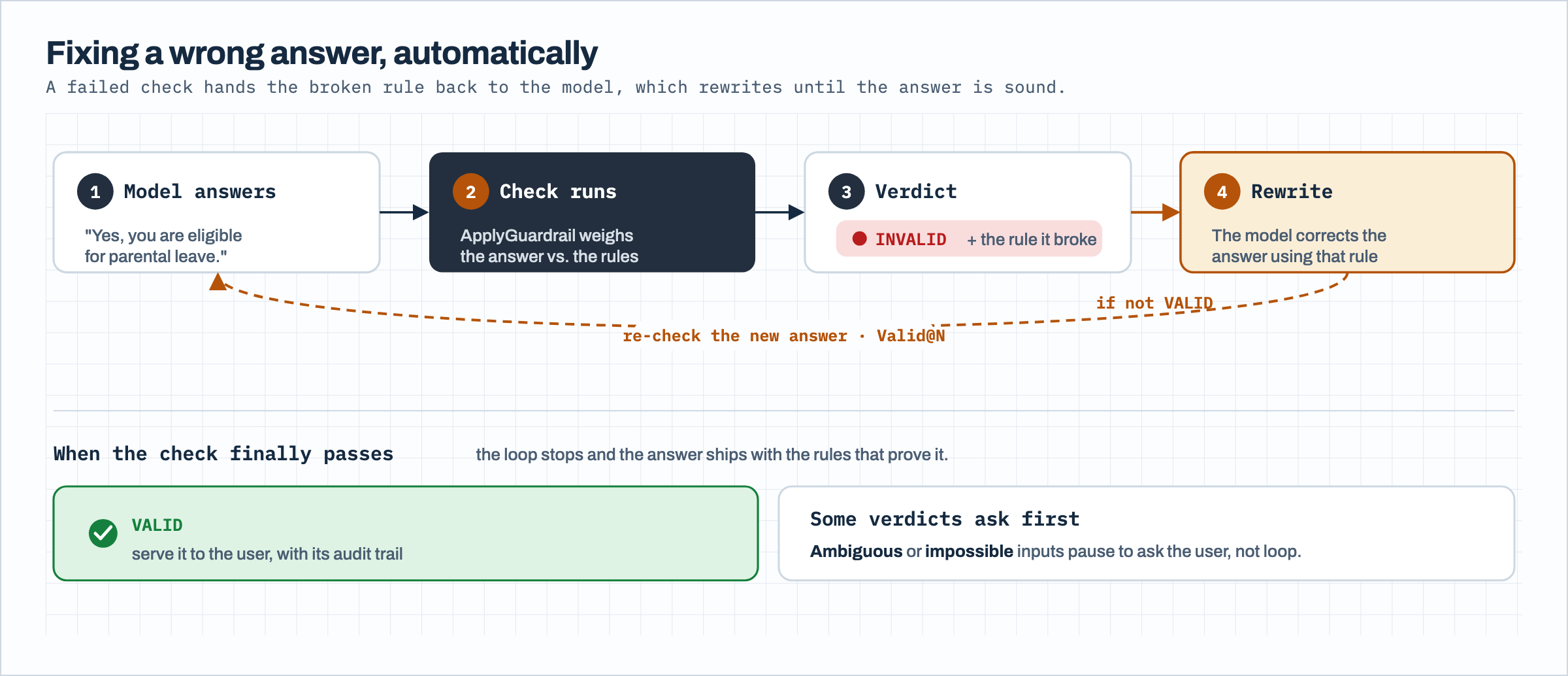
Figure 3: The runtime rewrite loop
The second is that a SATISFIABLE verdict isn’t a failure. Automated Reasoning distinguishes between an answer that’s consistent with your policy and one that is entailed by it. Suppose a rule says full-time employees with sufficient tenure are eligible. An answer that asserts eligibility is consistent with the policy but not proven by it, so the service returns SATISFIABLE rather than VALID. Reading that result as a failure leads you to change rules that were correct. The debugger skill encodes this distinction so the agent interprets verdicts the way the service defines them.
A practical constraint is worth noting because the skills handle it for you. A policy allows a limited number of concurrent build workflows, and a long refinement session can reach that limit. The skills release a slot automatically before each build by removing the oldest completed build, so an agent working through several refinements doesn’t stall on the cap.
Clean up
To avoid ongoing charges, delete the resources you created in dependency order, because a policy won’t delete while its test cases, build workflows, or versions still exist. Remove the test cases first, then the build workflows and the numbered version, then the policy, and finally the guardrail. The skills follow this sequence when they tear down resources, and you can also delete everything from the Amazon Bedrock console.
Conclusion
Automated Reasoning checks give you verifiable, explainable verdicts on AI answers, and the quality of those verdicts depends on the policy behind them. The Agent Skills in this post move the full authoring lifecycle into code, so building, reviewing, testing, debugging, deploying, and validating a policy become repeatable steps your coding agent can run and you can review. The approach is not limited to the parental leave example or to one agent. It applies to various policy domains, from finance to insurance to healthcare, and installs into the coding agents you already use.
To get started:
- Install the skills from the code repository into your coding agent.
- Point the builder skill at your own policy document and review the quality report.
- Add question-and-answer tests that reflect how your users ask questions, and refine until they pass.
- Deploy a versioned policy behind a guardrail and validate answers with the runtime skill.
To go deeper, explore these related resources:
- Build reliable AI systems with Automated Reasoning on Amazon Bedrock for the console workflow.
- How Automated Reasoning checks in Amazon Bedrock transform generative AI compliance for the compliance perspective.
- Automated Reasoning checks rewriting chatbot for a runtime reference implementation.
- The Amazon Bedrock Automated Reasoning checks user guide and the Amazon Bedrock API reference.
About the authors
Source
Originally published at aws.amazon.com.